Part I: Python Fundamentals
Chapter 1
Setting Up Your Python Environment
Why This Chapter Exists
Petroleum engineering runs on calculation. Every well drilled, every reservoir modeled, every production forecast issued depends on numbers --- pressures, flow rates, fluid properties, rock characteristics --- computed correctly and applied with judgment. For decades, engineers ran these calculations by hand, then in spreadsheets, then in expensive commercial software. Python changes that equation. It is free, it is powerful, and it handles everything from a single pressure calculation to a reservoir simulation with millions of grid cells.
This chapter does two things. First, it gives you a working Python environment on your own machine, with every library you will need for the rest of this book. Second, it introduces the petroleum industry itself --- what it is, how it works, and why computation sits at the center of it. By the end, you will write your first engineering calculation: the hydrostatic pressure equation, the formula that keeps wells from blowing out.
infoWhat You'll Learn
- What the petroleum industry is and why computation is central to it
- How to install Python and the core scientific libraries (NumPy, Pandas, Matplotlib, SciPy)
- How to use Jupyter Notebooks for interactive analysis and VS Code for building reusable tools
- How to calculate hydrostatic pressure --- one of the most important equations in drilling engineering
What Is the Petroleum Industry?
Petroleum engineering is the discipline of finding hydrocarbons trapped deep underground, bringing them to the surface, and managing the reservoir so that it produces as much as economically possible over its lifetime. It is one of the most capital-intensive industries on earth. A single offshore well can cost over a hundred million dollars. The decisions petroleum engineers make --- where to drill, how deep, what fluids to pump, when to shut a well in --- are backed by physics, geology, chemistry, and increasingly, computation.
If you are new to this field, what follows is the foundation you need before any code will make sense. If you already work in the industry, treat this as a refresher and pay attention to where Python fits into each phase.
Where Oil Comes From
Crude oil is not sitting in an underground lake. That is the most common misconception, and it matters because it shapes how you think about every calculation in this book.
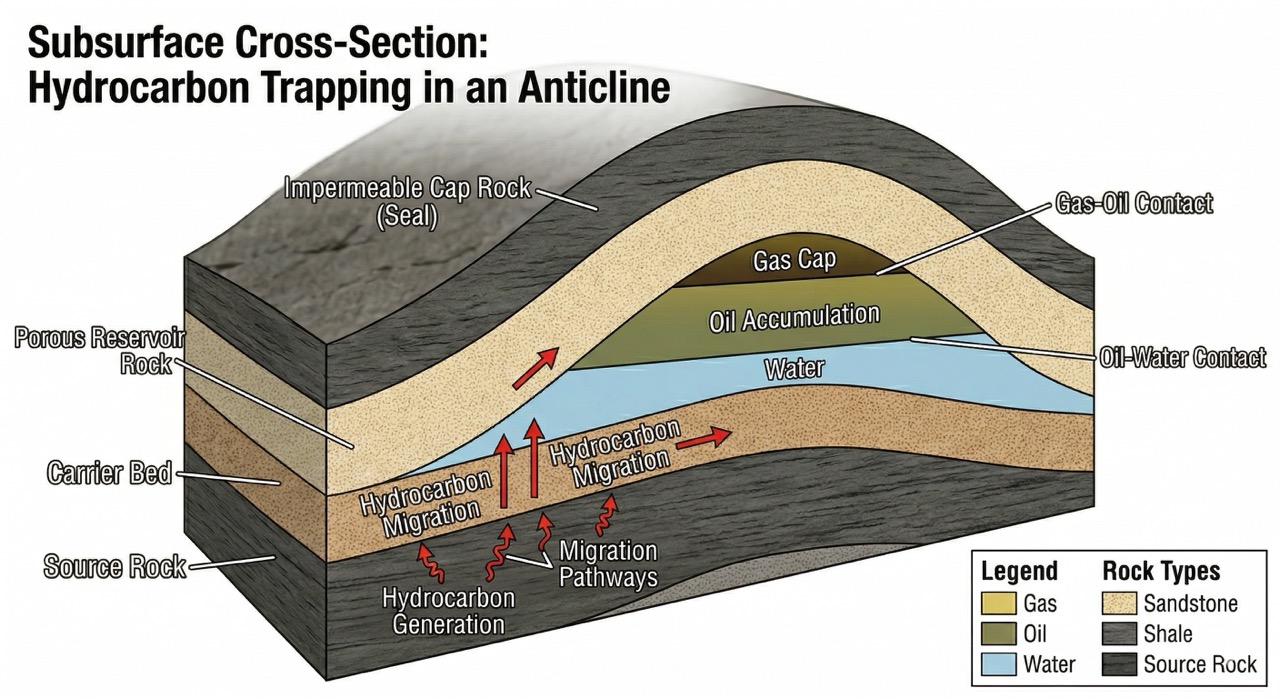
Hundreds of millions of years ago, tiny marine organisms --- plankton, algae --- died and settled on the ocean floor. Layer after layer of sediment buried them. Heat and pressure over geological time converted that organic matter into hydrocarbons --- the molecules we call oil and natural gas.
Those hydrocarbons migrated upward through porous rock until they hit an impermeable barrier --- a cap rock --- and became trapped. The porous rock formation where hydrocarbons accumulate is the reservoir. Think of a kitchen sponge soaked with oil, buried two miles underground, sealed under a layer of solid shale. That is what you are engineering against. You cannot see it directly. You infer its properties from indirect measurements --- and then you calculate.
The Petroleum Lifecycle
Every oil and gas project follows a broad lifecycle, and computation plays a role at every stage:
- Exploration --- Geologists and geophysicists search for promising underground structures using seismic surveys (sending sound waves into the earth and interpreting the echoes) and surface geology. The core question: Is there a trap down there that might hold hydrocarbons? Seismic data processing is one of the most computationally demanding tasks in any industry.
- Appraisal and Drilling --- If exploration looks promising, wells are drilled to confirm the resource. Drilling rigs bore through thousands of feet of rock using a rotating bit and a circulating fluid called drilling mud. Each well is a multi-million dollar investment, and the engineering calculations that govern mud weight, casing design, and wellbore stability determine whether that investment succeeds or fails.
- Production --- Once a well is completed, hydrocarbons flow to the surface. Engineers monitor pressures, flow rates, and fluid compositions continuously. They optimize artificial lift systems when natural pressure declines. They forecast how long the well will produce and how much it will ultimately recover. Every one of these tasks involves data, models, and code.
- Abandonment --- Every well eventually stops producing economically. It is plugged with cement, equipment is removed, and the site is restored. This phase carries its own engineering calculations and regulatory requirements.
What ties all four phases together: you are making decisions about rock formations you cannot see directly, thousands of feet below the surface. You rely on indirect measurements --- pressure readings, flow tests, well logs, seismic images --- and the calculations that interpret them.
That is where Python comes in. Not as an abstract programming exercise, but as the tool that turns raw measurements into engineering decisions.
Installing Python
Python is a general-purpose programming language, but petroleum engineering computation relies on a specific set of scientific libraries. Rather than installing each one separately, we use Anaconda --- a free Python distribution that bundles everything you need in a single download.
Here is what Anaconda includes and why each library matters:
- NumPy --- numerical arrays and linear algebra. Every pressure calculation, every matrix operation, every array of well data runs through NumPy.
- Pandas --- tabular data handling. Production records, well headers, and fluid property tables all arrive as rows and columns. Pandas loads, cleans, filters, and analyzes them.
- Matplotlib --- plotting and visualization. Decline curves, pressure-depth profiles, production histories, well log displays --- Matplotlib produces them all.
- SciPy --- scientific computation. Curve fitting for decline analysis, optimization for production allocation, numerical integration for reserves estimation.
- Jupyter --- interactive notebooks. You build analyses step by step, mixing code, results, and documentation in a single file.
Installation Steps
- Go to anaconda.com/download and download the installer for your operating system (Windows, macOS, or Linux).
- Run the installer and accept the defaults. On Windows, choose "Just Me" for the installation type and check "Add Anaconda to PATH" when prompted.
- Open a terminal (on Windows, open Anaconda Prompt from the Start Menu) and verify the installation:
$ python --versionYou should see Python 3.11.x or Python 3.12.x. Any version 3.9 or above works for this book.
- Confirm the core libraries are available:
$ python -c "import numpy; import pandas; print('All libraries ready.')"If that runs without errors, your installation is complete. The following code block verifies it from inside Python and reports the version numbers:
If you see an ImportError, Anaconda was likely not installed correctly. Revisit the steps above, or check that you are running Python from the Anaconda environment rather than a system Python.
Two Tools for Two Jobs
You will use two tools throughout this book, and understanding when to use each one will save you time from the start.
Jupyter Notebooks
A Jupyter Notebook is an interactive document made up of cells. Each cell contains either Python code or formatted text. When you run a code cell (Shift + Enter), the output appears directly below it. This makes notebooks ideal for exploratory analysis: you build a calculation one step at a time, inspect the results, adjust, and continue.
In petroleum engineering, notebooks are where you will analyze well logs and production data, build and test decline curve models, create pressure-depth plots and other visualizations, and document your assumptions alongside your calculations so that a colleague --- or your future self --- can follow the reasoning.
To launch Jupyter, open a terminal and type:
$ jupyter notebookA browser window opens with a file navigator. Click New → Python 3 to create a notebook. Key shortcuts:
Shift + Enter--- run the current cell and move to the nextEscthenB--- insert a new cell belowEscthenM--- convert a cell to Markdown (for text and headings)Ctrl + S(orCmd + Son macOS) --- save
VS Code
When your work grows beyond a single notebook --- when you write reusable functions, build multi-file projects, or create scripts that run on a schedule --- you need a code editor. Visual Studio Code (VS Code) is free, fast, and widely used in both software engineering and data science.
To set it up:
- Download VS Code from code.visualstudio.com.
- Install the Python extension by Microsoft (search in the Extensions panel).
- Install the Jupyter extension to run notebooks directly inside VS Code.
Use Jupyter when you are exploring data and testing ideas. Use VS Code when you are building tools meant to last. This book uses both.
Your First Calculation: Well Information
Before we get to engineering formulas, let's confirm that your environment works by building something practical --- a well information card, the kind of summary that appears at the top of every well report in the industry.
Every variable is named using petroleum terminology: well_name, target_depth_ft, spud_date. This is a deliberate practice. When you read mud_weight_ppg later in this chapter, you will know immediately that it holds a mud weight measured in pounds per gallon. Code written this way is readable by engineers, not just programmers.
Why Mud Weight Matters
This is your first real engineering calculation, and it is worth understanding why it exists before you see the formula.
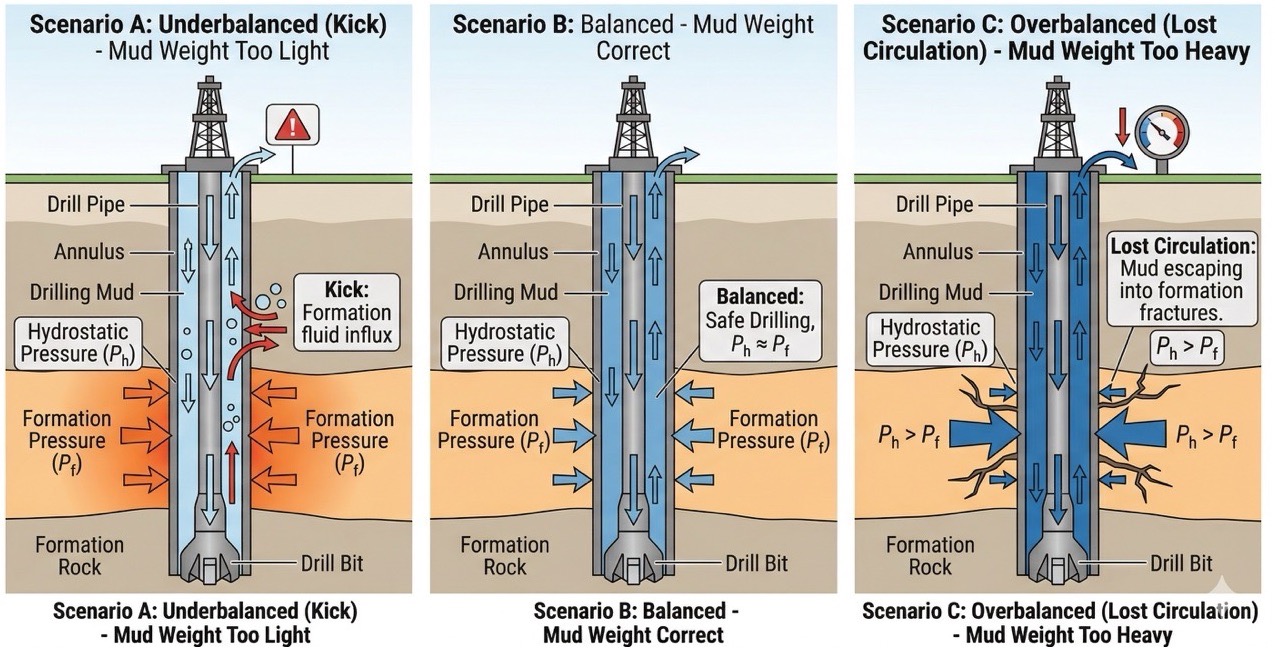
When you drill a well, you continuously pump a fluid --- called drilling mud --- down through the inside of the drill pipe, out through nozzles in the bit, and back up the space between the pipe and the rock (the annulus). This circulating mud serves several purposes: it cools the bit, carries rock cuttings to the surface, and stabilizes the wellbore walls. But its most critical function is pressure control.
Deep underground, rock formations contain fluids --- oil, gas, water --- under enormous natural pressure. The column of drilling mud in the wellbore must exert enough pressure to hold those formation fluids in place.
If the mud is too light, it cannot counterbalance the formation pressure. Formation fluids enter the wellbore --- a kick. If a kick is not controlled, it escalates into a blowout: an uncontrolled release of hydrocarbons to surface. Blowouts are among the most dangerous events in the industry. People die. Equipment is destroyed. Environmental damage can last decades.
If the mud is too heavy, it exerts more pressure than the rock can withstand. The formation fractures, and mud pours into the cracks --- lost circulation. You lose expensive fluid, you may damage the reservoir you are trying to produce from, and in severe cases, you lose the well entirely.
The difference between "too light" and "too heavy" can be less than one pound per gallon. Getting it right is not optional. It starts with one equation.
The Hydrostatic Pressure Equation
The pressure at the bottom of a column of fluid depends on two things: the density of the fluid and the height of the column. In oilfield units:
where:
- = hydrostatic pressure in psi (pounds per square inch)
- = mud weight in ppg (pounds per gallon)
- = true vertical depth in feet
- = a unit conversion constant that reconciles ppg, feet, and psi
This formula is one of the first things a drilling engineer learns, and one of the last things they stop using. Let's implement it.
The if/else block at the end is your first piece of engineering logic in Python. The code checks whether the well is safe and reports the result. That is not a toy example --- it is the same check a drilling engineer performs before every operation.
Applying the Calculation: A Well Planning Table
In practice, you rarely calculate hydrostatic pressure at a single depth. A well has multiple casing strings set at different depths, and the drilling team needs to know the pressure at each one. Here is how you build that table in Python instead of a spreadsheet.
If the mud weight changes tomorrow, you change one variable. If the well plan adds a new casing string, you add one entry to the dictionary. The code handles the rest. That is why Python replaces spreadsheets for engineering work --- not because it is fancier, but because it is faster to maintain and harder to break.
What Comes Next
You now have a working Python environment, a foundational understanding of the petroleum industry, and your first engineering calculation. The hydrostatic pressure equation is simple arithmetic, but the reasoning behind it --- why mud weight has to fall within a narrow window, what happens when it doesn't --- is the kind of understanding that separates someone who can run a formula from someone who knows what the formula means.
The next chapter covers Python fundamentals: variables, data types, control flow, and functions. Every concept will be taught through petroleum engineering problems. The goal is the same throughout this book: you learn the tool by using it on work that matters.
Exercises
-- Install and Verify
Download and install Anaconda from anaconda.com/download. Open a terminal (or Anaconda Prompt on Windows) and confirm that each of the following comma...
-- Mud Weight Window
A drilling engineer must keep the mud weight within a safe operating window --- heavy enough to prevent a kick, light enough to avoid fracturing the f...
-- Unit Converter
Petroleum engineering uses a mix of oilfield units (psi, bbl, ft, ppg) and SI units (kPa, m³, m, kg/m³). Using the conversion factors below, convert e...
-- Bottomhole Pressure Report
The bottomhole pressure (BHP) in a well is the sum of surface pressure and the hydrostatic pressure of the mud column: BHP=Psurface+0.052×MW×TVDBHP = ...
Summary
- The petroleum industry is the business of finding, extracting, and managing hydrocarbons trapped in rock formations underground. Engineers make decisions about resources they cannot see directly, relying on data and calculation.
- Crude oil forms from ancient organic matter subjected to heat and pressure over geological time. It accumulates in porous rock (the reservoir) sealed by impermeable cap rock.
- The petroleum lifecycle spans exploration, drilling, production, and abandonment. Computation plays a role in every phase.
- Anaconda bundles Python with NumPy, Pandas, Matplotlib, SciPy, and Jupyter --- the core tools for petroleum engineering computation.
- Jupyter Notebooks are suited to interactive analysis and documentation. VS Code is suited to building reusable tools and multi-file projects.
- Hydrostatic pressure () is one of the most fundamental calculations in drilling engineering. The mud weight must be heavy enough to prevent a kick but light enough to avoid fracturing the formation. Getting it wrong has serious consequences.
- Variable naming matters. Code written with petroleum terminology (
mud_weight_ppg,tvd_ft,formation_pressure_psi) is readable by engineers, not just programmers.